

New · Now available
The graphics asset manager for Brainstorm-based production environments.
HTML-based, multi-site Graphic Media Asset Management solution that centralises the ingest, management, approval and delivery of production assets — from pictures and videos to Brainstorm scenes, rights and metadata — so teams share assets while keeping constant control of them.
EN · ES · JA interface Broadcast-focused
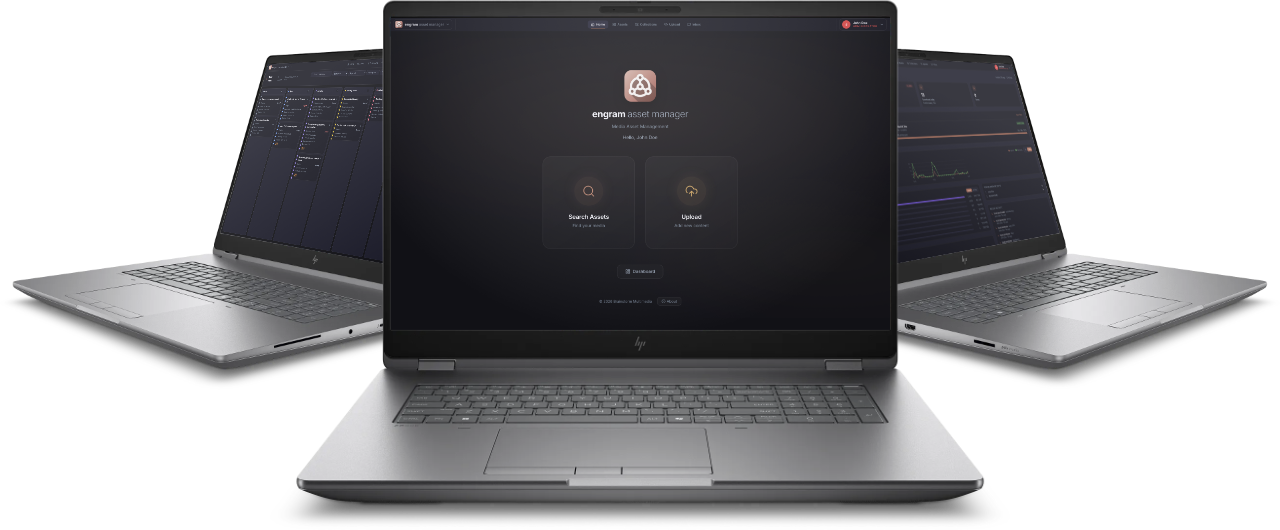
Engram is an HTML-based, multi-site Asset Management platform for broadcast organisations using Brainstorm production environments. It provides a governed system of record for editorial media, graphics scenes and reusable libraries. Work Orders connect editorial demand to graphics production; versions, rights, QC and audit preserve operational confidence; and product integrations continue the lifecycle through scene loading, testing and programme operation.
ONE PLATFORM
From ingest to on-air
One governed system of record
Media, Brainstorm scenes, reusable libraries, versions, rights, workflow status and audit history — together and searchable in one place.
One web workspace
A responsive interface to find, classify, review and manage content, while product integrations handle publishing, picking, loading and delivery.
Multi-site by design
Push/pull replication exchanges complete asset records — binaries, thumbnails, tags and metadata — between configured sites.
WHO IS IT FOR?
Built for fast-paced production
Engram is designed for the requirements of fast-paced production environments based on the Brainstorm ecosystem. Automating the catalogue, approval and rights management steps makes life easier for journalists, editors, designers, production operators and system administrators — and keeps every piece of content traced and consistent.
Live production
Approved scenes retrieved, tested and operated with OnDemand applications.
News & Sports
Daily programmes with recurring templates, tight deadlines and shared libraries.
Elections
High-volume data graphics, many contributors, no room for the wrong version on air.
ROLE-BASED
Four roles, one shared record
The outcome is shared, so at every step each user can identify the asset, its programme context, current version, approval state, dependencies, rights and history before it is used downstream.
Journalists & Editors
Upload and classify editorial media with descriptions, tags, collections and rights metadata, create Work Orders for graphics production and review the resulting assets.
Graphics Artists
Accept and complete Work Orders, create eStudio, Aston and InfinitySet scenes, publish and retrieve them, and reuse shared libraries.
Operators
Load and test the latest approved programme scene on the intended server, then operate complex programmes with OnDemand applications.
System Administrators
Configure Engram, multi-site replication and Brainstorm servers, inspect status and content, preview outputs, and launch applications with the required scene.
WORKFLOW
From editorial request to programme operation
Engram covers the whole path. Journalists and Editors upload and classify assets; the catalogue organises them by type, metadata, tags, collections, audit and rights; Work Orders trigger graphics production; approval is what makes a piece available for on-air use; and operators play it out live with the OnDemand tools.
01Upload & classifyEditorial media enters with descriptions, tags and rights metadata.
02CatalogueAssets organised by type, metadata, tags, collections, audit and rights.
03Work OrderThe request reaches graphics with its context and deadline.
04Produce & reviewArtists build the piece; decisions cycle on status and rights until it is finished.
05ApproveApproval is what makes the finished piece available for on-air use.
06Playout liveOperators load the approved scene and run the programme live with the OnDemand tools.
Underneath: the administration layerSystem Administrators control identities, users, rights, server load and the many other parameters that are essential to the operation but transparent to production users.
COLLABORATION
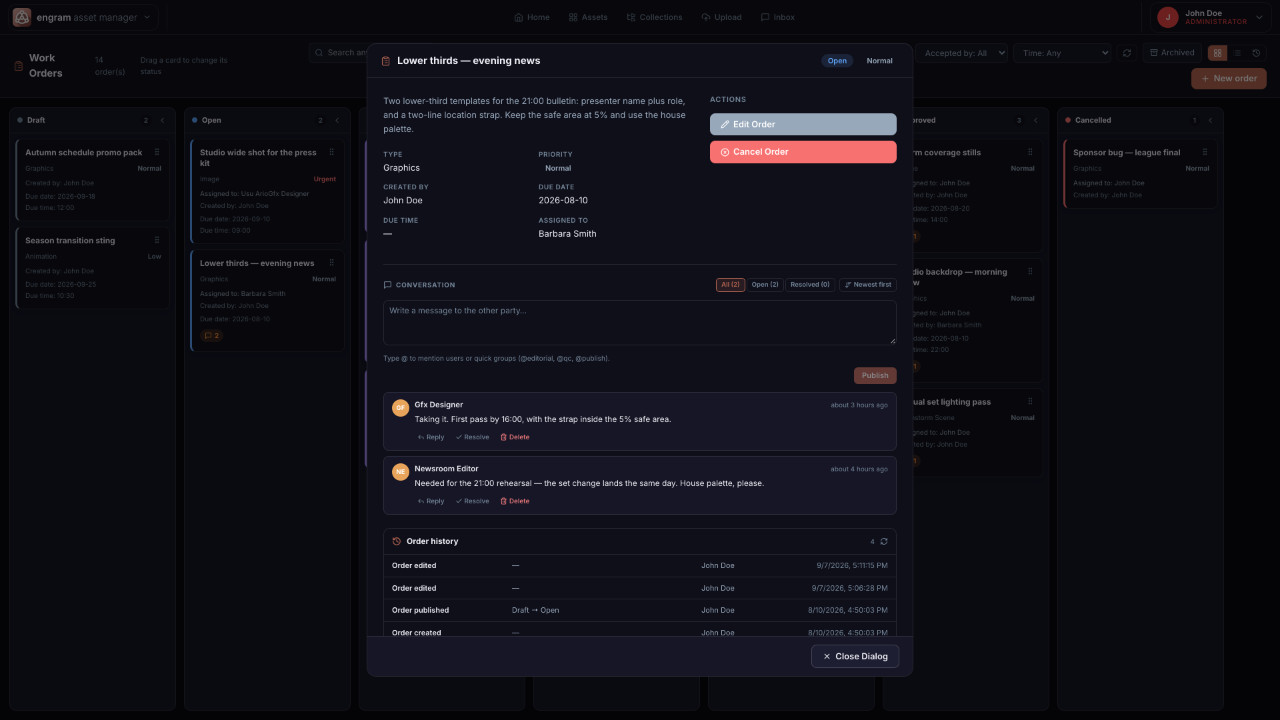
Work Orders connect the request to the result
A Work Order links a request, its assignee or team, the conversation, the review and the resulting asset in one traceable record. Assign to a named user, a role or a reusable group; track type, priority and deadline; approve or reject, resubmit, cancel, reopen and archive — with an independent audit throughout.
Every user has an Inbox: the Work Orders assigned to them or to their group, with state, priority and deadline in one list, so nobody has to ask what they are supposed to be working on.
And the conversation stays with the work. Comments and chat live on the Work Order itself, so the brief, the questions, the changes and the approval are attached to the asset instead of scattered across email and messaging apps — and they are still there months later, when someone needs to know why a graphic looks the way it does.
Draft / OpenPublish the request
AcceptedArtist claims & works
CompletedResult linked & reviewed
ApprovedClosed & archived
ENGRAMDRIVE · INTEGRATED
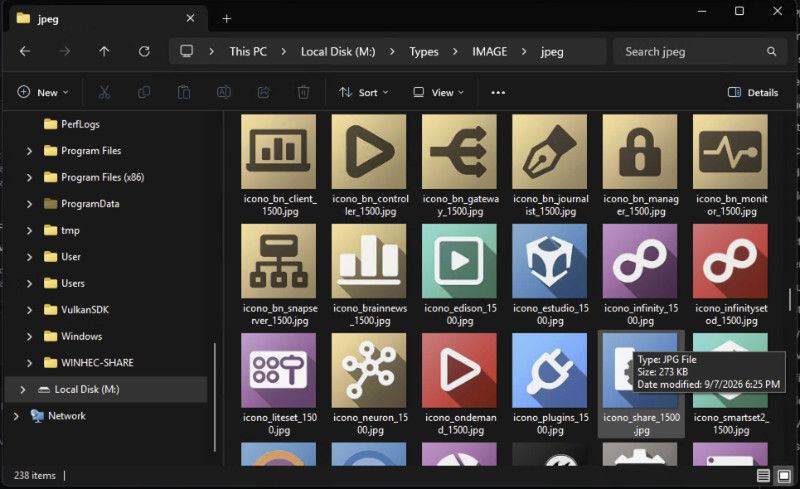
Your catalogue, as a Windows drive
Built into the platform, EngramDrive projects the governed Engram catalogue as a native Windows drive. Browse assets by Type, Collection or Tag straight from Windows Explorer — and pick them directly inside Aston and eStudio as if they were local files. Files hydrate on demand when opened, so artists work from one governed source of truth without manual downloads or copies.
Native drive (M:\) — the catalogue is a real Windows volume.
Three ways in — Types, Collections and Tags folder trees.
On-demand hydration — bytes fetched the moment a file opens.
Governed & read-only — reflects asset rights and versions.
Built for graphics — textures, fonts, 3D, scenes, sub-assets.
Ships with the EngramAgent — one Windows component on the workstation, not a separate product to buy.
SHARED GRAPHICS LIBRARY
Create once, reuse everywhere
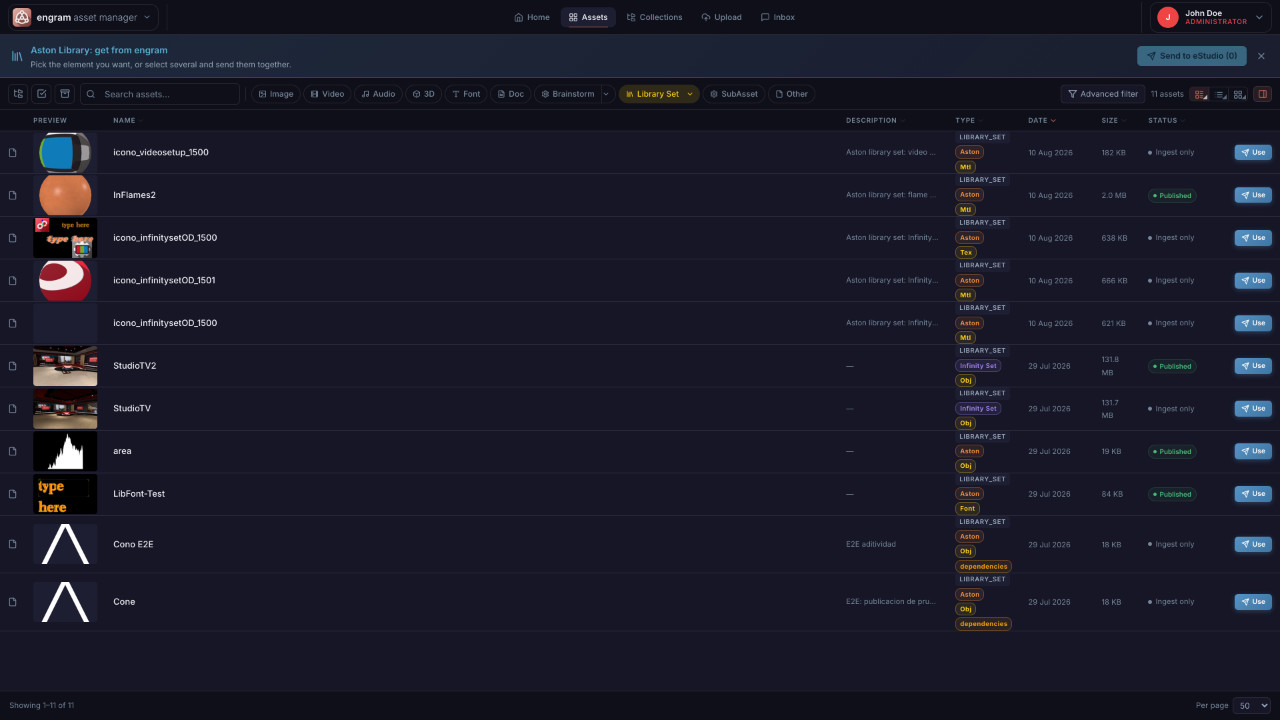
Graphics Artists use Engram both as a production library and as the governed home for Brainstorm scenes and projects. They store and recover eStudio, Aston and InfinitySet scenes or projects, related deliverables and reusable media — and the library shares sets, presets and effects, including objects, materials, textures and fonts. Any asset in the library can be shared between artists and sites.
- Object sets, materials & textures — searchable, previewable, versioned.
- Fonts — catalogued TTF, OTF, WOFF and WOFF2.
- Presets & effects — packaged with their dependencies.
- Scenes & projects — eStudio, Aston and InfinitySet, by programme, metadata or tag.
QUALITY & RIGHTS
Governance built in, not bolted on
QC approval is blocked while analysis is processing or failing; Admin Override is the only explicit, justified and audited exception.
Quality control
FPS, duration, resolution, audio channels, silence and black-frame analysis — plus two-pass EBU R128 loudness correction that preserves the master, creates a new version and re-runs QC.
Rights & permissions
Configurable roles and granular permissions. Rights Types make Owner, Expiration and Territory Required, Optional or Not applicable — enforced at workflow gates.
Audit & integrity
Full asset and operational audit with user, timestamp and context, and a SHA-256 checksum on every asset.
BRAINSTORM & MCR INTEGRATION
From approved scene to on-air
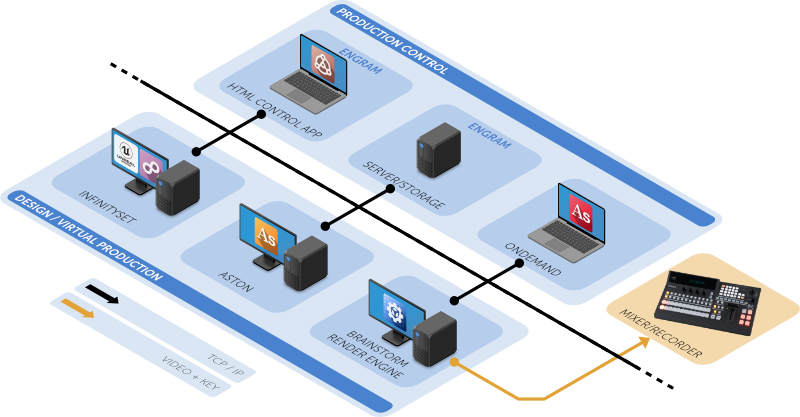
Picker, Publish and Load connect Engram to your Brainstorm products. Operators load and test the latest approved scene, then run complex programmes in Aston OnDemand or InfinitySet On Demand — and Aston OnDemand editors can pick assets directly into graphic file fields.
- Picker — open the Engram explorer from compatible file fields.
- Publish — save a scene or project into Engram.
- Load — send n Engram project to the running product.
- Delivery — Push Agent, shared storage or signed HTTP URL.
The Engram server can sit on the same workstation as the control application or on a different one. Because Engram stores Brainstorm projects and files, OnDemand retrieves them directly from the server and drives any render engine to produce the final output in real time — sent over SDI or TCP/IP to the output server, the production switcher, or straight to air through the OnDemand playlists. Everything runs on the broadcaster’s dedicated network.
MULTI-SITE
One catalogue, many sites
Push/pull replication exchanges complete asset records — binary, thumbnail, tags and metadata — between configured sites, with a global asset identifier for matching and a most-recent-wins conflict rule. Replication is API-triggered, so you schedule it with your own orchestration.
ARCHITECTURE
A modern platform that fits your facility
In the browser
The workspace is an HTML application: journalists, editors, graphics artists and administrators all work in a browser, on any modern desktop.
Everyone signs in with their own account, and configurable roles and granular permissions decide what each person can see, edit, approve and retrieve — in the web interface and in the picker inside OnDemand alike.
On the server
A private-by-default server stack: only the reverse proxy is normally exposed, while the database, cache and object store stay internal.
- Access Nginx + TLS (reverse proxy)
- Front end Next.js
- API NestJS REST API on Node.js
- Metadata PostgreSQL 16
- Object storage MinIO (S3-compatible)
- Queues Redis 7 + BullMQ
- Ingest Node.js watched-directory service
- Integrity SHA-256 checksum per asset
Deployment
The whole stack ships as containers and runs with Docker and Docker Compose — Docker 24+ and Compose 2.20+ — on your own infrastructure and inside your own network.
No cloud dependency unless you want one. Sizing depends on your workload.
SECURITY
Secure by default
Access, transport and recovery are handled the way a broadcaster’s IT department expects, with your own identity provider, your own certificates and your own backup routine.
Sign-in and single sign-on
Users sign in with their own account and password. Where you want single sign-on, Engram can optionally authenticate through Keycloak and plug into your existing identity provider, instead of keeping yet another separate list of users.
HTTPS and certificates
All traffic runs over HTTPS, with TLS terminated at the reverse proxy using your own certificates. Nothing about the platform requires opening it to the public internet.
System backups
The metadata database, the object store and the configuration can all be backed up with your standard tooling, so a site can be restored without rebuilding it by hand.
See how Engram fits your operation
Bring your programmes, media and Brainstorm scenes under one governed workflow — from editorial ingest to on-air.
FAQ
Frequently asked questions
An HTML-based, multi-site Asset Management platform for broadcast organisations using Brainstorm production environments — a governed system of record for editorial media, graphics scenes and reusable libraries.
Four roles, each with its own responsibility: Journalists and Editors upload and classify editorial media and raise Work Orders; Graphics Artists accept and complete them, creating and publishing eStudio, Aston and InfinitySet scenes; Operators load and test the latest approved programme scene and operate it with OnDemand applications; System Administrators configure Engram, replication and Brainstorm servers.
A component that projects the governed Engram catalogue as a native Windows drive, so assets can be browsed by Type, Collection or Tag in Explorer and picked directly inside Aston and eStudio, with files hydrated on demand.
Through Picker, Publish and Load: operators load and test the latest approved scene, then run programmes in Aston OnDemand or InfinitySet On Demand.
Yes. Push/pull replication exchanges complete asset records, binaries, thumbnails, tags and metadata between configured sites.
Engram accepts any file as an asset, with optimised support for common image, video, audio, 3D, font and document formats, and also for proprietary Brainstorm formats such as scene packages (SCN, LDR, ZIP).
Built-in QC (including EBU R128 loudness with audited two-pass correction), configurable Rights Types with workflow gates, and a full audit trail.
As a containerised stack run with Docker and Docker Compose on your own infrastructure: Nginx with TLS, a Next.js front end, a NestJS REST API on Node.js, PostgreSQL 16 for metadata, MinIO for object storage, Redis with BullMQ for queues, and a SHA-256 checksum per asset. Sizing depends on your workload.
Through Work Orders. A Work Order links the request, its assignee or team, the conversation, the review and the resulting asset in one traceable record. Every user has an Inbox with the Work Orders assigned to them or to their group, and comments and chat live on the Work Order itself, so the brief, the questions, the changes and the approval stay attached to the asset instead of scattered across email and messaging apps.
Approval is what makes the finished piece available for on-air use. Operators then load the approved scene, test it on the intended server, and run the programme live with the OnDemand tools — Aston OnDemand or InfinitySet On Demand.
Every user has their own named account with a password. Where you want single sign-on, Engram can optionally authenticate through Keycloak and plug into your existing identity provider, so you do not maintain a separate list of users. Roles and granular permissions then decide what each person can see, edit, approve and retrieve — in the web interface and in the picker inside OnDemand alike.
All traffic runs over HTTPS, with TLS terminated at the reverse proxy using your own certificates, and only that reverse proxy is normally exposed: the database, cache and object store stay internal. Nothing about the platform requires opening it to the public internet.
Yes. The metadata database, the object store and the configuration can all be backed up with your standard tooling, so a site can be restored without rebuilding it by hand.
CONTACT
¿Podemos ayudarte?
Tell us about your operation and we’ll show you how Engram fits.